
Desktop Label Printer Applicator
Apply Labels Directly From Your Desktop Label Printer
A desktop label printer applicator makes it possible to print and apply labels at the same workstation instead of printing a label, removing it from the printer, and then applying it by hand.
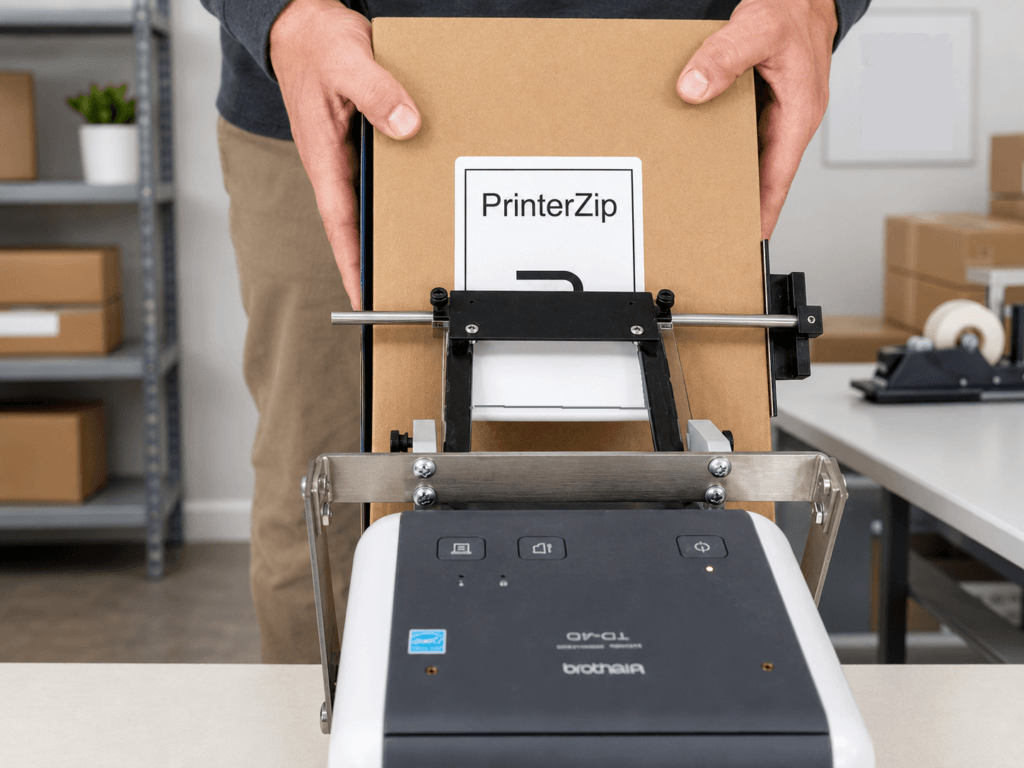
The PrinterZip Z10 is designed specifically for desktop label printers and barcode printers. As each label prints, the Z10 guides the label into position so it can be applied directly to a box, mailer, package, or other flat product.
This turns what is normally a two-step process into one continuous workflow.
Print → Position package → Apply label
No powered applicator. No separate labeling station. No need to pick up and carry each printed label.
What Is a Desktop Label Printer Applicator?
Desktop thermal and barcode printers are designed to print labels, not apply them.
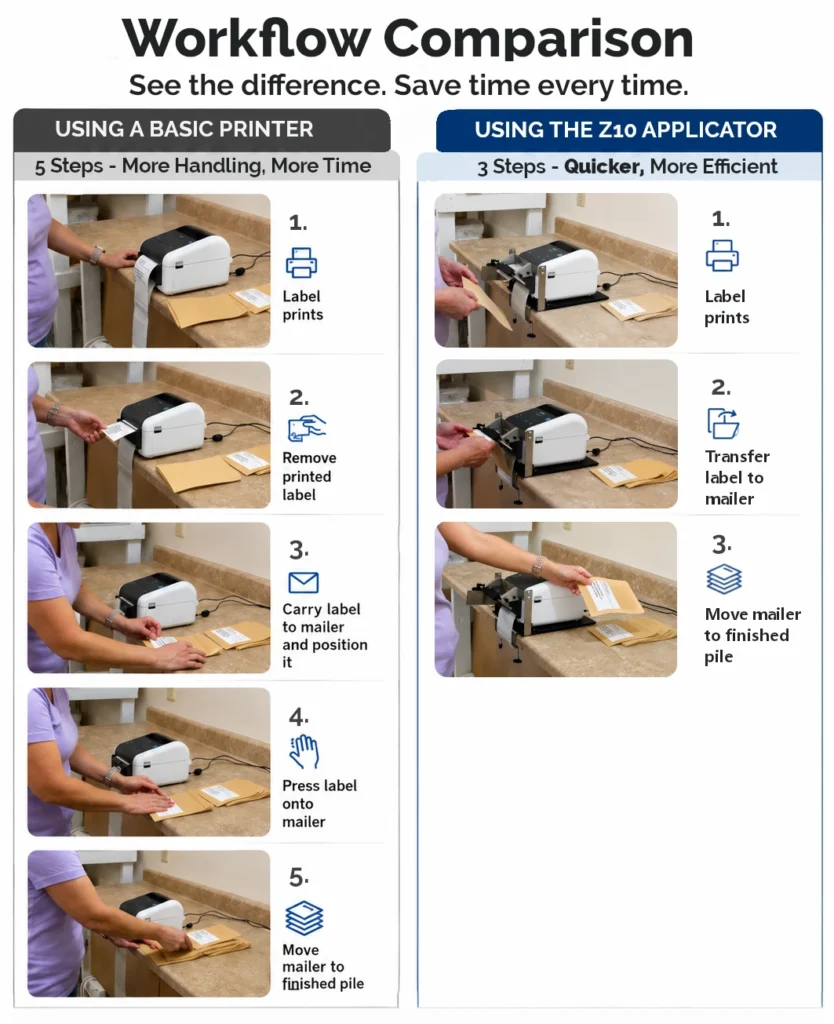
Normally, the operator:
Prints the label.
Removes the label from the printer.
Carries it to the package.
Positions it by eye.
Presses it onto the surface.
A desktop label printer applicator changes that workflow by applying the label directly at the printer.
With the PrinterZip Z10, the printed label is captured and guided into position so the operator can bring the package to the label rather than bringing the label to the package.
What Changes When You Stop Applying Labels by Hand?
Faster Label Application
Hand application:
Every label must be removed from the printer, carried to the package, positioned, and applied.
Desktop printer applicator:
Printing and application take place at the same workstation.
Result:
Label application can be approximately 30% to 70% faster, depending on the labeling task and workflow.
Straighter, More Consistent Label Placement
Hand application:
The operator has to visually position every label.
Desktop printer applicator:
The applicator provides a repeatable guide for positioning the package and label.
Result:
Labels can be placed straighter and more consistently from package to package.
Easier Labeling While Wearing Gloves
Hand application:
Labels can stick to gloves while the operator is peeling or positioning them.
Desktop printer applicator:
The operator does not need to handle the exposed adhesive during application.
Result:
Gloves are much less likely to interfere with the labeling process.
Apply Labels Without Touching the Label Surface
Hand application:
The operator typically handles both the label and its adhesive during placement.
Desktop printer applicator:
The label can move directly from the printer to the package.
Result:
Labels can be applied with no hand contact with the printed label surface.
Lower Labor Cost Per Label
Hand application:
Repeated label handling adds time to every package.
Desktop printer applicator:
Reducing the number of handling steps reduces the time required for each application.
Result:
Faster labeling can reduce the labor cost associated with applying each label.
A Different Approach to Print-and-Apply Labeling
“I already have a desktop label printer. I just want a faster and easier way to put the labels it prints onto my packages.”
That is the problem the PrinterZip Z10 is designed to solve.Rather than automating the entire packaging line, it improves the manual labeling station itself.
How the PrinterZip Z10 Works
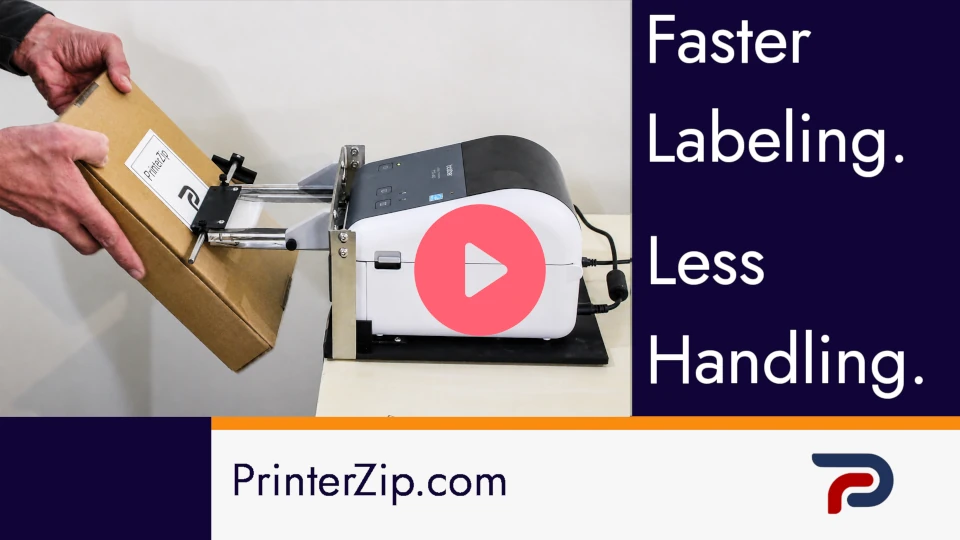
The Z10 mounts with a compatible desktop label printer equipped with a peeler/dispenser.When a label prints:- The printer separates the label from its backing.
- The Z10 receives and supports the printed label.
- The operator positions the package against the applicator.
- The label is transferred directly onto the package.
No Electricity, Sensors, or Programming
Unlike many label applicators, the PrinterZip Z10 does not require:
- Electricity
- Compressed air
- Electronic sensors
- Software integration
- Programming
- Powered actuators
Its mechanical design means there is very little to configure.
That makes it particularly appropriate for businesses that want to improve a manual labeling operation without installing an automated labeling system.
Desktop Label Printer Applicator vs. Hand Application
| Labeling task | Hand application | Desktop printer application |
|---|---|---|
| Label handling | Pick up label at printer and carry to work table to apply | Label stays at the printer |
| Application speed | Multiple manual steps | Fewer handling steps |
| Placement | Positioned by eye | Guided placement |
| Wearing gloves | Adhesive may contact gloves | No need to handle adhesive |
| Label surface contact | Label is normally handled | Little or no label handling |
| Equipment | Printer only | Printer + mechanical applicator |
| Power required | None for application | None for Z10 |
| Labor per label | More manual handling | Reduced handling time |
Who Is a Desktop Label Printer Applicator For?
A desktop label printer applicator can be useful anywhere labels are printed individually and manually applied to relatively flat surfaces, including:
Shipping departments
E-commerce fulfillment
Warehouses
Mailrooms
Healthcare and laboratory operations
Manufacturing
Product packaging
Inventory and barcode labeling
It is particularly useful when a business already owns a desktop thermal or barcode printer and does not need the speed, expense, or complexity of a fully automated print-and-apply system.
Can I Use My Existing Label Printer?
In many cases, yes.
The PrinterZip Z10 is designed to work with compatible desktop label printers using a label dispensing or peeler configuration.
Because printer construction and label paths differ between models, the Z10 uses a receiver arrangement appropriate for the printer being used.
Do I Need an Automatic Label Applicator?
Not necessarily.
An automatic label applicator is useful when products are continuously moving through a production line and labeling must occur without operator involvement.
If an employee is already handling each box, mailer, pouch, or product, a desktop printer applicator can offer a much simpler alternative.
You retain manual control of the package while removing much of the unnecessary manual handling of the label.
Turn Your Desktop Printer Into a Simple Print-and-Apply System
If you already print labels one at a time from a desktop label printer, the PrinterZip Z10 can eliminate the separate process of picking up each label and carrying it to the product.
Print the label. Position the package. Apply it.
No electricity.
No compressed air.
No programming.
No powered applicator.