
Label Applicator for Zebra Desktop Label Printers
If you use a Zebra desktop label printer such as a ZD621, ZD611, ZD421, ZD411 or ZD220, you do not have to peel and apply every printed label by hand.
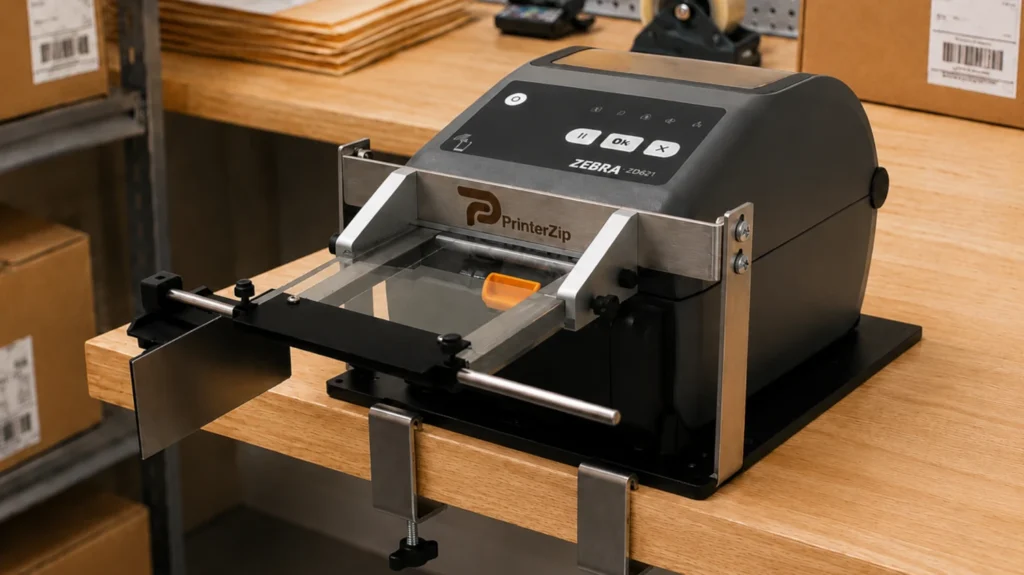
The PrinterZip Z10 is a mechanical label applicator designed to work with compatible Zebra desktop and barcode printers. It provides a simple way to transfer freshly printed labels from the printer onto boxes, mailers, packages and other flat or mostly flat products.
Unlike traditional automatic print-and-apply systems, the Z10 requires no electricity, compressed air or software integration. It works directly with your desktop label printer at a manual labeling workstation.
How Do You Apply Labels From a Zebra Desktop Label Printer?
A Zebra desktop label printer such as the ZD621 normally prints a pressure-sensitive label with the backing liner still attached.
There are several ways to handle the label after printing.
1. Peel and Apply Labels by Hand
The most common method is to remove the printed label from the backing paper by hand and place it on the package.
This works well for occasional labeling, but when many items need to be labeled, repeatedly peeling, handling and positioning each label adds an extra step to the process.
2. Use a Zebra Label Dispenser/Peeler
Zebra produces label dispenser/peeler modules for almost all of their desktop label printer models.
The dispenser separates the printed label from its backing liner and presents the peeled label at the front of the printer.
This eliminates the need to manually peel the label from the backing paper, but the operator still normally removes the presented label and positions it on the package by hand.
3. Add a PrinterZip Z10 Label Applicator
The PrinterZip Z10 works with the printer’s label dispensing function to take the process one step further.
As the Zebra desktop printer prints and peels the label, the PrinterZip system receives the label and allows the operator to place it onto the package without manually peeling and handling the label.
This creates a simple print-and-apply workflow using the desktop printer you already use.
How the PrinterZip Z10 Works With Zebra Desktop Printers
The Z10 mounts with the printer at the labeling workstation and is configured for the printer model and label size being used.
The basic workflow is:
The Zebra Printer prints the label.
The printer’s dispenser/peeler separates the label from the backing liner.
The PrinterZip Z10 captures and supports the freshly printed label.
The operator moves the package into position.
The label is transferred onto the package.
There are no motors, electronics or pneumatic components in the Z10.
The result is a straightforward way to combine label printing and label application at one workstation without installing a conventional industrial print-and-apply machine.
Compare: Zebra Printer with Peeler vs. PrinterZip Z10
| Feature | Zebra Printer With Peeler | Zebra Printer with Peeler and PrinterZip Z10 |
|---|---|---|
| Prints labels on demand | Yes | Yes |
| Presents peeled label (separated from backing liner) | Yes | Yes |
| Reduces manual label peeling | Yes | Yes |
| Allows label to be applied without touching it | No | Yes |
| Helps position label onto package | No | Yes |
| Requires operator to handle adhesive side of label | Yes | No |
| Uses powered applicator mechanism | No | No |
| Requires compressed air | No | No |
| Designed for manual workstation use | Yes | Yes |
| This table applies to Zebra Models ZD411, ZD421, ZD611, ZD621 and ZD220.The Zebra dispenser and PrinterZip Z10 are not competing accessories. The Z10 uses the printer's peeling capability as part of the label application process. | ||
Why Use a Z10 With a Zebra Desktop Label Printer?
Apply Labels Without Peeling Them by Hand
The printer’s dispenser removes the backing liner, while the Z10 provides a way to move the label onto the product without the traditional print, peel, pick up and place routine.
Eliminate Contact With the Label Adhesive
Avoiding contact with label adhesive can be useful when workers wear gloves or when keeping fingers away from the adhesive surface is desirable.
Apply Labels Without Contacting the Label
Concerns about chemical materials in thermal labels may make it desirable to avoid hand contact with label surfaces.
Improve Label Placement
The Z10 provides a repeatable path for moving the printed label from the printer to the item being labeled, helping operators place labels more consistently.
Speed Up Repetitive Labeling
For businesses printing and applying labels one after another, eliminating separate peeling and handling steps can simplify the workflow and increase the speed of label placement.
Keep Your Desktop Printer
You do not need to replace a Zebra Desktop Printer with a large industrial print-and-apply machine. The Z10 is intended to add label application capability to a compatible desktop printer.
No Power or Software Integration
The Z10 is mechanical. It does not require electricity, compressed air, sensors, controllers or integration with your label-printing software.
What Can You Label?
A Zebra Desktop Label Printer and PrinterZip Z10 combination is particularly suited to labels being applied to flat or mostly flat surfaces, including:
Shipping boxes
Poly mailers and padded mailers
Cartons
Envelopes
Flat packages
Barcode-labeled products
Square Bottles
Clamshell Containers
The Z10 is intended for manually positioned products rather than high-speed conveyor applications.
Already Own a Zebra Desktop Printer?
If you already have a compatible Zebra printer, you can add a PrinterZip Z10 configured for your printer and choose the appropriate label tray for the label size you use.
Need the Complete System?
PrinterZip also offers packages that combine a compatible desktop printer, a PrinterZip Z10 applicator and a label tray.
This can be a convenient option for businesses setting up a new labeling workstation.
Frequently Asked Questions
Is there a label applicator that can apply labels directly from Zebra Desktop Thermal Printers?
Yes. The PrinterZip Z10 is a mechanical desktop label printer applicator that can be configured for compatible Zebra printers equipped with a label dispenser/peeler.
What Zebra Desktop Printer models are compatible with the Z10?
The Z10 is compatible with Zebra direct thermal Models: ZD411, ZD421, ZD611, ZD621 and ZD220. Both regular and healthcare versions are supported. The Z10 is not compatible with linerless models and thermal transfer models.
Does the PrinterZip Z10 work with Zebra Thermal Transfer Desktop Printers?
No. At this time we do not offer compatible Z10 units for Zebra’s thermal transfer printers. The Z10 is only compatible with Zebra direct thermal printers. We do offer compatible Z10 units for Brother brand thermal transfer printers as well as direct thermal printers.
Does the PrinterZip Z10 print labels?
No. Your Zebra Desktop Printer prints the labels. The PrinterZip Z10 works with the printer to assist with applying the freshly printed label.
Does a Zebra Desktop Printer need a peeler to work with the Z10?
Yes. The Z10 relies on the printer’s label dispenser/peeler to separate the printed label from its backing liner before application.
Is the PrinterZip Z10 automatic?
No. The Z10 is a manually operated label applicator. It does not automatically feed products through a conveyor or apply labels without operator involvement.
Does the Z10 require electricity?
No. The PrinterZip Z10 has no electrical connection and does not require compressed air.
Is the Z10 the same thing as the Zebra label dispenser?
No. The Zebra dispenser peels the label from its backing liner and presents it at the printer. The PrinterZip Z10 uses that peeled label as part of a system that assists with placing the label onto the package.
Can the Z10 apply shipping labels?
Yes. A Zebra deskop printer matched with a Z10 can be used for shipping labels when the label dimensions and package surface are appropriate for the selected PrinterZip label tray.
Can I use the Z10 for barcode and product labels?
Yes. The Z10 is not limited to shipping labels. It can be used with compatible label sizes for barcode labels, identification labels, product labels and other pressure-sensitive labels.
Is the PrinterZip Z10 a print-and-apply system?
The Z10 creates a manual print-and-apply workflow using a desktop label printer. It differs from industrial automatic print-and-apply systems because product positioning and label application remain operator controlled, while the Z10 requires no powered applicator mechanism.